
Archive for 2009

boingboing logo

Tuesday, November 3rd, 2009

One of my favorite blogs: boingboing asked for a critique of a logo change.

My 2¢’s? The new logo looses a visual bouncing reference created by the letter height and whitespace. See what I mean below:

boingboing

Also, the before conforms to a smaller grid of pixels 7×45 if I’m not mistaken. The after would take twice that.

Bryan ♥♥ Soumintone

Monday, November 2nd, 2009

Our good friends Bryan and Sou had a second wedding this weekend. The first one was a summer event on the Oregon coast. This one was held in Tacoma near Sou’s family and included many Laotian traditions.

Unfortunately, my camera didn’t do very well in the given lighting. Some of the photos are blurry and I may have gotten a bit sepia-happy near the end. Whoops! There is also a video bonus at the very end of this post.

On Tuesday, the happy couple boards a plane for a two-month honeymoon in southeast Asia. Let’s all bug them to keep us up to date on their blog: The Places In Between

(more…)

Social Media – Getting Your Message Out

Wednesday, October 28th, 2009

Picture 25Presentation

Videos

Simple Preview (Plugin for WordPress)

Wednesday, October 28th, 2009

screenshot-1Enables you to give a link to anonymous users for public preview of a post before it is published.

Download

Download the file from wordpress.org/extend/plugins/simple-preview/

Credit

Where credit is due: This plugin is just an updated/modified/simplified version of Public Post Preview 1.3 by Matt Martz and Jonathan Dingman

Description

Have you ever been writing a post with the help of someone who does not have access to your blog and needed to give them the ability to preview it before publishing? This plugin takes care of that by generating a simple URL that can be given out for public preview.

Where credit is due: This plugin is a updated/modified/simplified version of Public Post Preview 1.3 by Matt Martz and Jonathan Dingman

Core Changes:
1. Completely removed the use of “nonce” variable. Posts marked preview are now accessible by multiple anonymous users. There is no longer a 24hr time limit.
1. Public_Post_Preview used the option variable as an array to store preview state – genius! However, it’s use seemed backwards with an empty item == preview true. This logic was reversed so: simple_array[,,true,,true] now means that p=1 and p=4 have previews. This also allows for the preview to be turned off by default.
1. Removed extra variables for a cleaner URI: http://www.yourblog.com/?p=1502&preview=true

Installation

1. Upload the `simple-preview` folder to the `/wp-content/plugins/` directory or install directly through the plugin installer.
1. Activate the plugin through the ‘Plugins’ menu in WordPress or by using the link provided by the plugin installer

TwitCategory (Plugin for WordPress)

Thursday, October 8th, 2009

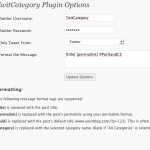
TwitCategoryAnnounces new posts (from a selected category) on twitter.

Download

Download the file from wordpress.org/extend/plugins/twitcategory/

Updated 2010-03-02

The plugin has been updated based on requests from the comments below. It now supports [post] and URL shortening from Tinyurl, IsGd and Bitly!

How to install:

Download and unzip the folder twitcategory.

Upload twitcategory to the /wp-content/plugins directory.

Activate the plugin through the Plugins menu in WordPress Admin (you may need to be using a wordpress administrator)

Please note that TwitCategory will create a table in your wordpress database called ‘twitcategory’. It will clobber any previous table with that name.

Fill in your twitter account information in the twitcategory configuration menu found in the Manage menu in WordPress Admin.

Where credit is due:

This plugin is a updated/modified version of Twitpress by Thomas Purnell  (email : tom@thomaspurnell.com)
Twitpress v0.3.2 – http://wordpress.org/extend/plugins/twitpress/
We should all thank Thomas fro creating the great plugin and releasing it under a GPLlicense!

Owls have crazy eyes

Wednesday, October 7th, 2009

THIS.

From owl in box [Reynen's Livejournal] via BoingBoing:

september113-thumb-640x454-26594

Well…

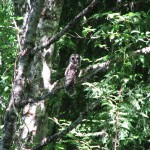
It reminded me of this picture that I never got around to posting. It was taken last summer on our first attempt to react the Bull of the Woods fire tower. We were cutting away logs to slowly advance up this dirt road, when all of the sudden, something went flying out of the bushes and landed in a nearby tree. It was an extremely rare (and pissed off) spotted owl. All I could get was this one blurry photo before it flew off.

Spotted Owl

Pear Cider (Process and Recipe)

Thursday, October 1st, 2009

So we decided to make hard pear cider (perry, or poiré) this year.

There are some good recipes on the web, but very little documentation on the complete process. Hopefully this log of our process will fill in the gaps for you. Before we begin, here are some of the essentials.

  • Type of fruit: Ripe, organic Bartlett pears.
  • Amount of fruit: 10lbs of fruit produced 6lbs of cider – 2800ml  or about 3qt.
  • That’s about: 65-75lb of fruit for 5gallons at full OG.
  • However: Full OG was 1.070, so we added water to bring it down to 1.055.

32382502Picking the pears

09-27-2009

Finding cheap pears was more difficult then I originally imagined. We were planning to juice the fruit and thus didn’t really care about it’s appearance. I put an ad on craigslist wanted – asking for anyone who might have a tree around town, so that we might collect the windfalls. There were a few leads, but none of them produced many pears.

So, I started looking at u-pick options. Oregon is a great place to pick fruit, but pears ranged in price from $0.50 to $1.00 a pound and many of the options were 50+ miles away. Then, by chance I found a much more local farm that was offering organic Bartlett pears for only $0.20/lb.

32366104It is a small farm is called Vancil-Polehn and I found them via this ad. Here is an excerpt: “Organic Bartlett pears .20 per lb for Pears (some have scabs on them that is the reason behind the cheap prices) STILL TASTE WONDERFUL!  OPEN FROM 9am-5pm”

They are in located in the Redland/Oregon City area about 17 miles from my house. Much better then heading all the way to Hood River. If you go, make sure to wear shoes and long pants. There are blackberries around many of the trees that want to gobble up your pears. You might also consider bringing your own fruit picking device. We were happy to use the can-on-a-stick that they have available, but it was no the most efficient method.

It took four of us a few short hours to pick 225lbs of pears.

photo(4)Ripening the fruit

09-27-2009

Much of the fruit was very firm. I decided to lay it out on a tarp in the guest bedroom to ripen. It was set out on Sunday. By Wednesday, all of the pears were yellow and giving off a pleasant aroma. They also started to attract fruit flys.

In hindsight, it may have been better to press the fruit green. Pressing the juice from the ripe/soft flesh ended up being problematic. Skip to “Pressing out the juice” for more details.

Grinding / Chopping / Scratting

09-30-2009

To coax the juice out, you first have to cut it into small pieces (commonly called scratting). Pressing whole pears will just result in frustration. The smaller the pieces, the more efficient your pressing will be.

The options are 1) spend all day chopping by hand, 2) rent an expensive grinder 3) build your own scratter! Guess which one we went with?

Our scratter is a smaller version of this design. It was made using a rolling pin, stainless screws, a rod, some bearings and a 1/2hp motor. The motor was originally 1800rpm – so gearing was added to slow it down to around 850rpm.

As you can see, the scratter makes quick work of the fruit – producing thousand of tiny shreds, ready for pressing. Another advantage is that the screws don’t seem to cut the seeds. This will help keep out the cyanide.

Just note – the motorized version is fun and easy to make. However, it is also very dangerous. If it can grind apples, think what it would do to a finger… Please be safe.

pears - 06Pressing out the juice

09-30-2009

Once the pears are shredded, it is time to press out the juice. We were lucky enough to borrow a small press from our friends. Prior to pressing the pears, we did a dry run with a bucket of windfall apples. the press seemed to work quite well.

However, the pears proved to be more difficult.

We placed the pear shreds in a nylon bag (open at the top) inside the press and then applied pressure to the top of the press as we had done with the apples. Unlike the apples the pears seemed to “sauce” and squirt out around the edges of the press top.

pears - 12So we tried closing the top and pressing. This worked a little better, but too much pressure would cause the fine nylon bag to burst – sending pear in all directions.

The best method involved squeezing the bag by hand, then  applying pressure with the press. It seemed to work well, giving 6lbs (3 quarts) of cider for every 10lbs of fruit – or 60% efficiency. However, it took hours to go through all 175+lbs of pears. The remaining 40% of semi-dry, pear pulp was added to the compost pile.

I now believe that the problem might have been avoided by working with less-ripe fruit. The cells of fully ripe, yellow bartletts seem to hold on to the juice. This probably has to do with how the pectin sets up in ripe cell.

pears - 10Searching the web, there were several suggestions including: using different mesh bag styles, adding adjuncts like rice hulls and even freezing the fruit. If you have a bunch of ripe pears on hand, please experiment and let us know. As for me, I plan to just juice them earlier next time.

Setting the Cider

09-30-2009

From 165lbs of pears we ended with over 11gallons of raw cider. It seemed a little “gritty” so we strained it through some fine nylon to remove many of the particulates that had come from the pressing process.

pears - 16Then we tested the sugar content it with a hydrometer. It turned out to be 1.070, much higher then our recipe called for (1.045). Water was added to bring the OG to about 1.055. This is still a bit higher then our recipe called for, but should give a pleasing amount of alcohol near 5% after fermentation. An important thing to remember is that, unlike apples, pears have some un-fermentable  sugars. So keep your OG a little higher then you would with other ciders.

The addition of H20 brought it to about 13 gallons of cider divided between 3 buckets.

Then the chemicals were added. Each bucket received: 5 campden tablets (crushed) to kill the wild yeast, 1/2tsp of yeast nutrient and 3.75tsp of pectic enzyme to help break down all that nasty pectin.  This should sit for 12 hours before adding any yeast.

Remember to cover the buckets with a clear towel to keep the creepy-crawlers out.

Last Roll - 03

Fermentation Begins

10-01-2009

One packet of dry Pasteur Champagne yeast is gently sprinkled on top of each bucket. The directions say to ferment at 65-75F, but many sources including wikipedia suggest: ” a temperature of 4–16 °C (40–60 °F). This is low for most kinds of fermentation, but is beneficial for cider as it leads to slower fermentation with less loss of delicate aromas.” So, I wil be leaving these in the basement.

10-02: The next morning shows only minimal signs of yeast growth on the surface. Each container is given a vigorous stir (it’s last) to distribute the yeast.

10-07: For the past 5 days the cider has been really active. You can see the surface churning from all the CO2 that is being produced. However, there is surprisingly little foam (almost none).  This is in stark contrast to some apple cider that I had set up a week prior – it produced  a head of foam 2-inches thick each morning.

Racking

Last Roll - 38

10-12: Fermentation slowed and the three buckets were racked into two 6 gallon carboys. I left the thick sludge in the buckets, but was not too concerned about picking up sediment. By the next morning you could see a clear line where the sediment had already begun to settle.

Gravity was a surprisingly low 1.010 to 1.012 (depending on bucket). So…

  • (1.055-1.011) * 125 = 5.5 % alcohol by volume

The only problem with the high attenuation is that most of the sugars have been converted to alcohol – leaving the cider incredibly dry. At this point, you can barely taste the delicate pear flavors. I suspect that we will want to re-sweeten the cider before bottling. However, flavors change/develop in strange ways during secondary fermentation. So, we will just have to wait and see.

DSCN3878

11-08: It has been a month and yeast/pectin has settled quite a bit. Time to rack!

Five  gallons of liquid was syphoned from each bottle and into a fresh clean carboy. This means that there was almost a gallon of trub (dead yeast, pectin and other sediment) that was discarded.

We also mixed in something that many of you might find odd: egg white…

Egg white is a common fining agent in wine. The proteins bond to free-floating particles, weight them down and help them to settle to the bottom.

DSCN3882

This results in a clearer, less cloudy liquid. It only takes a little. Separate out the white from the yolk in a clean dish and double with water. Add a small pinch of salt to emulsify and then whisk with a fork. We added just a few table spoons to each batch. Vegans will have to use a different fining agent like bentonite (just not isinglass).

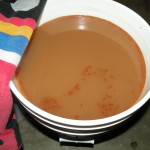
The cider is now a light, cream yellow in color. The bottle in the front of this photo is the pear cider. For comparison, the rear carboy is filled with an apple cider of a similar age. Both ciders are much clearer the a few weeks ago, but still slightly cloudy. The egg should help with that.

Bottling

To be updated.

Bull of the woods Fire Tower

Saturday, September 19th, 2009

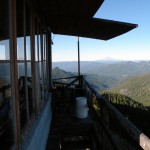
My dad and I finally made it up to the Bull of the Woods Fire tower – one of the most remote in Oregon.

Firefox respects Macintosh preferences, disrespects users
Thursday, September 3rd, 2009

Web forms rock

They are easily accessible, can feed information directly to a database and replace tree-killing paper versions.

Web forms suck

They are difficult to style, require massive validation and and the elements look drastically different on each browser.

And don’t get me started on accessibility.

OK, get me started…

It takes a lot of work to make forms accessible to those using assistance devices.

Yet, it is worth it – people with differing levels of sight and mobility deserve to be able to use your form. And sometimes, your form becomes the only option when they can’t interact with the paper version.

So webmonkeys, please think about:

  • Proper fieldset nesting.
  • Labels and titles that make sense.
  • TabIndex when appropriate.
  • Validation that works with screen readers.

But, even with all that – some users will be frustrated by the computers lack of cooperation. For instance…

On a Mac (OSX), using tab to navigate FAILS

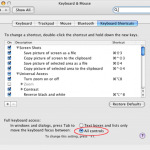
mac-system-preferencesYou see, buried deep in the system preferences (the computer’s, not the browser’s) is a setting for “Full Keyboard Access” that is set, by standard, to skip select, and radio button inputs.

FireFox seems to respect this and skips those elements. Good for FireFox. Bad for users.

The funny thing is that Safari partially ignores it and allows you to tab to select inputs. However, radio buttons are still out.

So, let your users know where to chance this setting:

Computer System Preferences > Keyboard and Mouse > Keyboard Shortcuts > Look to the bottom at “Full Keyboard Access” and select “All Controls”

… but of course the setting to recognize radio buttons IS A RADIO BUTTON!

So, good luck navigating to it via the keyboard.

Mixing Typefaces + a needed update

Wednesday, July 22nd, 2009

I am a bit of an idiot when it comes to print typography. On the web the choices have historically been limited and knowing the difference between san/serif has been enough. But, the times are slowly changing

The Classic Resource

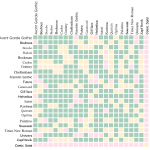
A coworker introduced me to this nice little cheat sheet was created in 1992. Although dated, many of the widely used web fonts are listed.  In the chart, a number from 1 to 3 appears where each pair intersects. 1 means that the two fonts are compatible, 2 means that with proper implementation the two fonts could work well together, and 3 means that they will clash.

10_typefaces

The chart is very useful, but is presented in such a way that would make Tufte cry. Issues include:

  • No representation of what the font actually look like
  • Numbers 1-3 are not good visual indicators of good-bad
  • Very, very hard to figure out what row/column you are on.
  • What is Text vs. Display anyway?
  • Why does Quorum come before Optima in an ordered list.

Time for an Update

I put together an interactive draft that you can find here (the image below is not interactive). Not all the issues are solved in this 0.1 version, but it is much more useful.

By the way: display (denoted by columns) means headings and text (denoted by rows) means body text, etc…

Picture 8