Archive for the ‘expertise’ Category
Friday, July 26th, 2019
Navigating a large college campus can be daunting for new students, especially for those with a disability. Providing a detailed, accurate, accessible map can help everyone get where they need to go. While the technology to create beautiful, interactive maps has been around for a while – many colleges only include a limited amount of […]
Posted in expertise, presentations, work, wpcampus | No Comments »
Wednesday, April 27th, 2016
WPscan is a popular command line tool for scanning WordPress installations to find vulnerabilities. It is a frontline tool used to find access points for your site – and – if it’s good enough for that hackers, you should be using it too! I recommend downloading it immediately to test your sites. However, I just […]
Posted in web development, work | No Comments »
Monday, October 13th, 2014
WordPress is an incredible platform for building full-featured, customized web applications. Every beer on the planet is made from the same four ingredients: hops, water, barley and yeast. Similarly, WordPress is built around a small feature set (posts, pages, media and tags), but from these you can build anything from a single blog to a […]
Posted in featured, highedweb2014, presentations, work | 7 Comments »
Thursday, November 14th, 2013
The PCC population is overwhelmed by technology. We want to help you navigate technology at PCC. This is why a collaborative venture between the TLC, TSS and a variety of departments who specialize in technology tools and methods is taking place at the Sylvania TLC (CC 223) Fall Term, 2013. Gabe shows off the WordPress […]
Posted in presentations, work | 2 Comments »
Thursday, October 3rd, 2013
Buildings and parking aren’t the only locations that people need to find on your campus. Why then, are they the only items marked on your maps? The technology to create beautiful, interactive maps has been around for a while. Unfortunately, many colleges choose to only include a limited amount of information. Often, it’s not a […]
Posted in expertise, featured, presentations, work | 4 Comments »
Thursday, October 4th, 2012
Take a quick look around the web and it becomes obvious – users really do create the best content. The articles of wikipedia, the videos of youtube and the LOLcats of the cheezburger network- all examples of platforms based entirely on user generated content.Now think about your students, faculty and staff. Given the opportunity, what […]
Posted in featured, presentations, work | 1 Comment »
Tuesday, October 19th, 2010
PCC’s lead web designer Gabriel Nagmay has spearheaded their college’s revolution in how it delivers its stories and gauges success. Today, from tweeting and blogging to RSS feeds and Google Analytics, Nagmay has led the college into a new era. Hear about the tools and techniques Gabriel used for PCC. Learn how to maximize your […]
Posted in featured, presentations, work | 2 Comments »
Wednesday, October 6th, 2010
At Portland Community College we have a huge student body, a gigantic amount of Web content, and a tiny little Web team trying to manage it all. Over the years, we have built a collection of custom Web apps to help us out. These work well, but take time and massive resources to maintain. All […]
Posted in featured, highedweb2010, presentations, work | 1 Comment »
Wednesday, October 28th, 2009
Presentation Download the slides Download the handout Videos Panther Goes to College Panther: PCC is Tobacco Free Twit Panther Poppe On Copyright
Posted in presentations, work | No Comments »
Thursday, September 3rd, 2009
Web forms rock They are easily accessible, can feed information directly to a database and replace tree-killing paper versions. Web forms suck They are difficult to style, require massive validation and and the elements look drastically different on each browser. And don’t get me started on accessibility. OK, get me started… It takes a lot […]
Posted in web development, work | 1 Comment »

 WPCampus: Mapping with accessibility in mind
 WPscan false positives
 WordPress and Beer: Homebrew web applications with WP
 Blogs @ PCC
 Placemarks to the people
 ALL THE THINGS!
 Revolutionizing How You Use the Web in PR
 Learning to Love the API
 Social Media – Getting Your Message Out
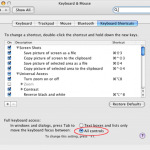 Firefox respects Macintosh preferences, disrespects users