Firefox respects Macintosh preferences, disrespects users

Thursday, September 3rd, 2009

Web forms rock

They are easily accessible, can feed information directly to a database and replace tree-killing paper versions.

Web forms suck

They are difficult to style, require massive validation and and the elements look drastically different on each browser.

And don’t get me started on accessibility.

OK, get me started…

It takes a lot of work to make forms accessible to those using assistance devices.

Yet, it is worth it – people with differing levels of sight and mobility deserve to be able to use your form. And sometimes, your form becomes the only option when they can’t interact with the paper version.

So webmonkeys, please think about:

  • Proper fieldset nesting.
  • Labels and titles that make sense.
  • TabIndex when appropriate.
  • Validation that works with screen readers.

But, even with all that – some users will be frustrated by the computers lack of cooperation. For instance…

On a Mac (OSX), using tab to navigate FAILS

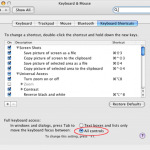
mac-system-preferencesYou see, buried deep in the system preferences (the computer’s, not the browser’s) is a setting for “Full Keyboard Access” that is set, by standard, to skip select, and radio button inputs.

FireFox seems to respect this and skips those elements. Good for FireFox. Bad for users.

The funny thing is that Safari partially ignores it and allows you to tab to select inputs. However, radio buttons are still out.

So, let your users know where to chance this setting:

Computer System Preferences > Keyboard and Mouse > Keyboard Shortcuts > Look to the bottom at “Full Keyboard Access” and select “All Controls”

… but of course the setting to recognize radio buttons IS A RADIO BUTTON!

So, good luck navigating to it via the keyboard.

The PCC Foundation

Monday, May 4th, 2009

The Project

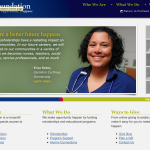
As part of the web team, I create and update dozens of pages every week. However, our newest launch, the updated PCC Foundation site, is something special.  Marketing had designated the foundation a co-brand. Meaning that it needs to maintain a strong relationship to, but is not a subsection of the college. This makes a lot of  sense organizationally and allowed us to do some cool stuff when designing the website.

This project was also special, due to the very short time line – as contact was initiated only 6 weeks prior to the needed launch. To streamline everything, we created a series of documents that noted the simultaneous content, architecture and design paths. Due dates and sign off points were highlighted (and stressed). With lots of hard work and clear communication via our liaison in the foundation, the project came together well and went live last Thursday, during a brand launch reception.

Foundation

Some Initial Feedback

There are still a few thing that we need to complete, but godd feedback is already coming in:

“Just got my first look at our new Web site — it is wonderful, beautiful, fabulous, not to mention easy-to-use, attractive, and supportive of our mission. Thank you, Web Team, for all your work, and thank you for completing the Web site in such a short time. You have created a site that will help us raise scholarship and program funds that will support students and the work of PCC faculty and staff. On their behalf, thank you, thank you!!”

“hey guys, site looks AMAZING and i’m already getting comments about it!”

New Media 101

Wednesday, September 17th, 2008

I was asked to give a presentation on “new media” during the 2008 ELC Inservice. Beforehand, I contacted a few of the faculty that planned to attend. They helped me decide to go the 101 route which ended up working well.

For each topic, we covered:

  • What is this thing?
  • The good, the bad…
  • Getting started (join the community)
  • Master the tool (set up your own)
  • And then some time for questions

This format worked and was well received by the final audience.

Materials

Yes, I still have not corrected the “feeda” spelling mistake!